How to Upload Images to Google Drive
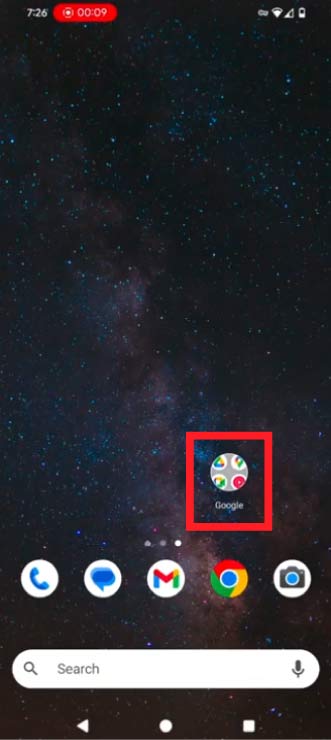
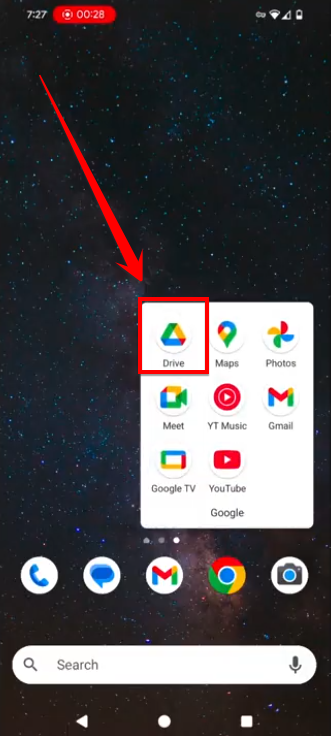
Make sure you are signed in to your Gmail account, and click on the Google Drive icon.
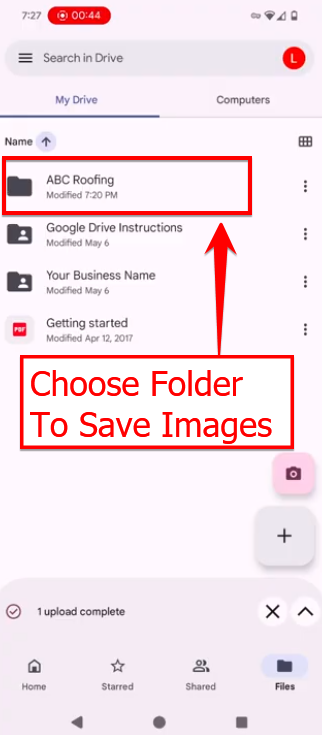
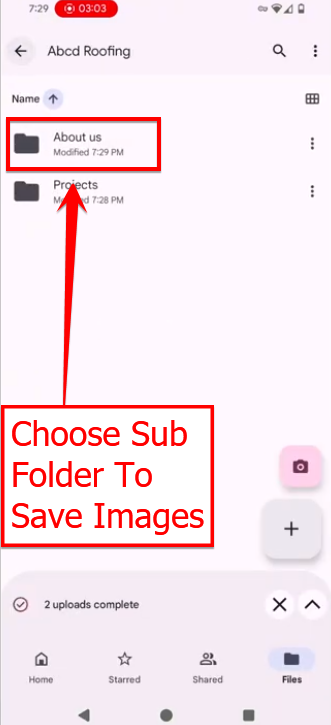
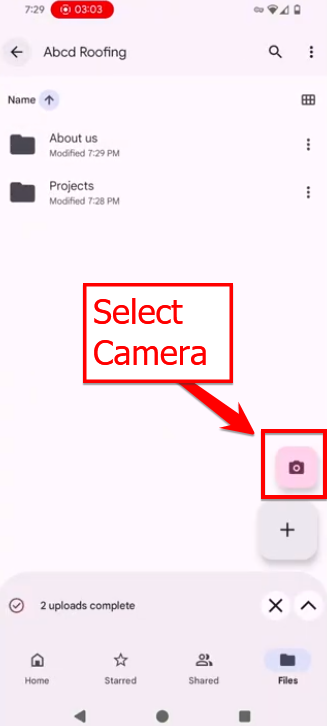
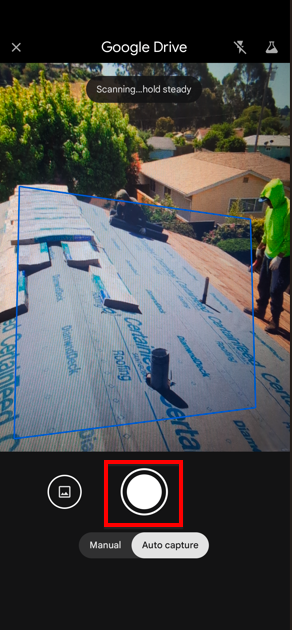
Take your picture
Select the image you want
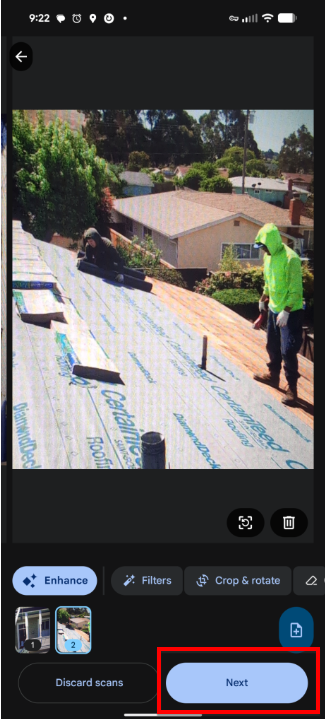
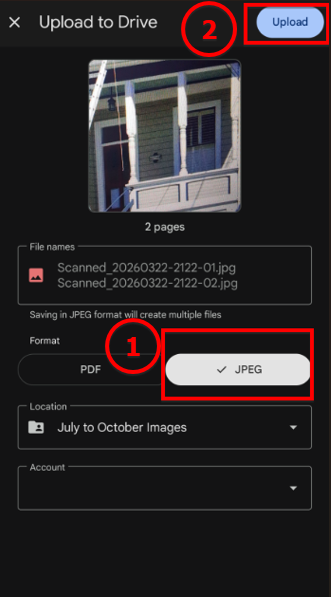
Always choose JPEG and select “Upload.”

Make sure you are signed in to your Gmail account, and click on the Google Drive icon.
Take your picture
Select the image you want
Always choose JPEG and select “Upload.”
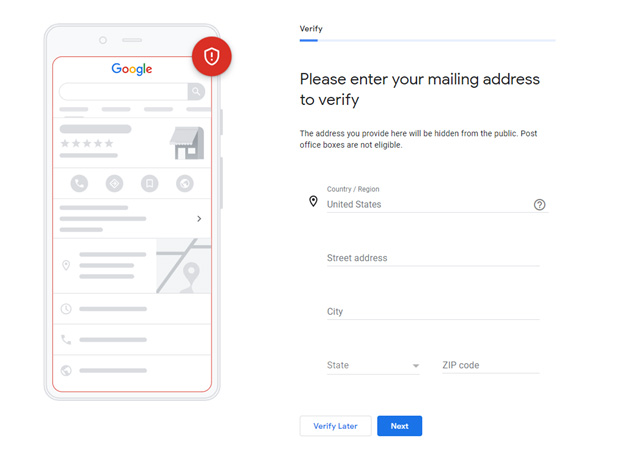
In the past, all you had to do is get a code via a postcard or text message and you were a verified Google local listing provider. However, in an effort to maintain the integrity of Google’s local businesses, Google is now requesting that more businesses do a video verification.
The video verification process can be frustrating for most business owners that understand the process will sometimes give up. However, we can assure that getting approved is definitely worth the effort. Our goal with this article is to help arm you with the correct information that will help dramatically increase the probability of getting approved.
This video will not be pre-recorded, saved, and then uploaded. Google will make you do a live video. Therefore, we recommend you do a practice video before you go and do the live version.
Also, this will be a private video between you and Google. This is not a video that will be shared with the general public.
Before you start your practice video, please consider the following questions:
1. Do you have a smartphone with an internet connection and video capabilities? Great! You will need one.
2. Do you have a Google account? If not then you will want to get one here: https://myaccount.google.com/
3. What is the nearest cross street to your business? Google will want you to stand around 3 to 7 feet from the nearest cross street. The video used for your business’s verification must be accompanied by proof of its source. This could include a recognized street name or a neighboring street number. For instance, a store sign or a structure with the name and number of the street. Showing unlabeled roads or property will not assist Google in determining your location. Google will want you to take a video of the nearest cross street.
4. Does your work vehicle have signage with your logo on it? If you don’t, then we recommend you get signage. This will help prove that it’s your work vehicle. This is especially important for service-based businesses.
5. Do you have access to your work vehicle or tools? Google will want to see that your work vehicle or tools are at your business location and that it is locked. You will want to open your work vehicle with your keys to show you own the work vehicle or the location of your business tools.
6. Does your business clearly show the business address? Make sure that the address to your business is easy to see and read.
7. Do you have access to your business address? Google requires evidence that your company is indeed located where you claim it is and that you are authorized to operate the Business Profile.
8. Google will want to see that your business is locked and that you have the keys to open your business. For instance, you should demonstrate yourself opening a cash register rather than simply showing us a cash register. And instead of just showing us that there is a staff room, demonstrate how to lock and unlock the entrance to your building.
9. Do you have work equipment? Google would like to see what equipment you use to service your customers.
10. Does your business have signage outside the building? Google will want to see signage outside your business address.
11. Do you have marketing material with your business name, phone number, and address? Google will want to see marketing material like business cards or brochures.
12. Do you have local or state documents that clearly show your business name and address? These documents could be a business license or LLC or Incorporation papers that show your business address and business name.
1) Can the nearest cross street be seen very clearly? Was I 3 to 7 feet away?


3) Did I very clearly show the signage of my business address?

5) Did I unlock the door to my business address?
6) Did I clearly show the equipment my business uses to provide the product or services to my clients?
7) Did I clearly show the name and phone number with the marketing material I distribute?
8) Did I zoom in and clearly show the state or local document that very clearly shows the name and address of my business?
9) Did I do this video in under 5 minutes? Try and do it in under 2 to 3 minutes.
10) Did I take the video vertically on my phone?
Review your video and see if you could answer with a resounding “YES” to all questions above. If that’s you, then you are ready to do this live now.
2. Give your business profile a final touch: Include your business name, address, phone number, website, category, and any other information that is important to your operation in the required fields. Fill out all the information completely and accurately.
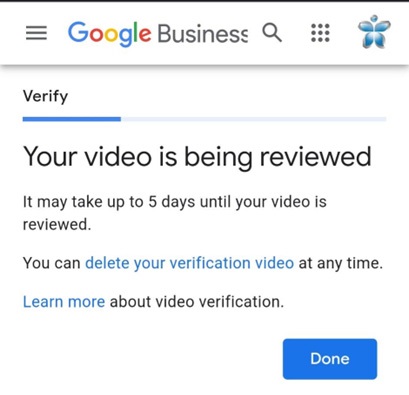
4. If you are happy with the video you took, then it will prompt you to upload the video. Most good videos are anywhere between 2 to 3 minutes long. Once you finish, then you will get a message like the one seen below.
It can appear difficult at times to complete the Google My Business verification procedure and the numerous steps required, such as video verification. However, knowing the rationale behind the verification procedure and the significance of emphasizing particular parts of your company will help you effectively navigate the criteria.
The purpose of Google My Business verification is to build credibility, safeguard users, and preserve the platform’s integrity. Business owners have the chance to exhibit their sincerity, professionalism, and distinctive value proposition through video verification.
| Do’s | Don’ts |
| To ensure a quick and professional process, do plan and prepare your video verification in advance. | Avoid submitting a video that portrays your company negatively or is of poor quality or professionalism. |
| To portray your company in the best possible light, make sure your video is clear, well-lit, and well-shot. | Don’t fill your video with unnecessary or irrelevant content. Limit yourself to the key elements that best represent your company. |
| Do give a brief introduction to your company in the video and include pertinent details about your products and services. | Don’t exaggerate or make deceptive statements about the qualities of your goods, services, or business. |
| Do highlight your business’s physical location and any distinguishing characteristics. | Don’t undervalue the value of good audio. Make sure your voice is balanced and clear when you discuss various topics. |
| Mention any honors, recognitions, or noteworthy accomplishments that lend credibility to your company. | Do not skimp on the video or ignore any of the details that Google My Business has specified. |
| Keep your video brief and informative, including everything Google asks for and anything else that can provide legitimacy to your company. | Leave out any private or delicate information that should not be made public. |
| Do ensure all signage is clear and visible. | Don’t quickly pass over important documents to avoid them being blurry. |
|
Do ensure your business address and name is on the state-approved or local documents like a business license that will show in your video. MAKE SURE TO ZOOM IN ON ANY DOCUMENTS THAT SHOW YOUR BUSINESS NAME AND ADDRESS.
|
Don’t show documents with your business name that doesn’t have a correct matching address. |
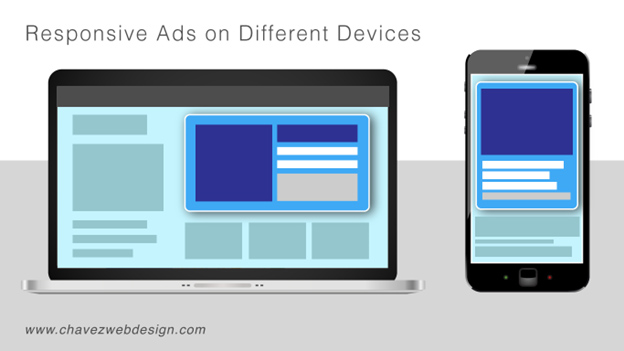
Utilizing responsive display ads can be the right choice for you. Responsive display ads are designed to adapt and render professionally on any device, so they are perfect for helping advertisers capture new customers through different channels. In addition, campaigns powered by responsive display ads enable advertisers to customize creative assets with ease while gaining visibility into how they are performing in real-time. Read on as we dive deeper into how responsive display ad campaigns can help increase your ROI and maximize success!
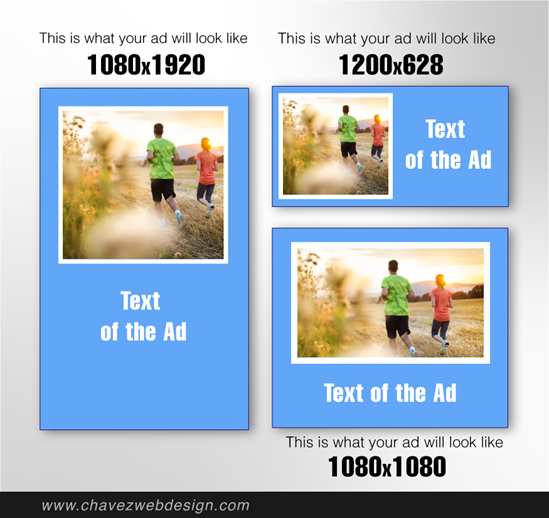
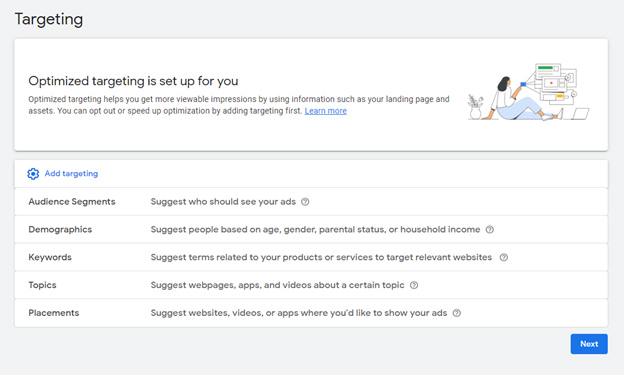
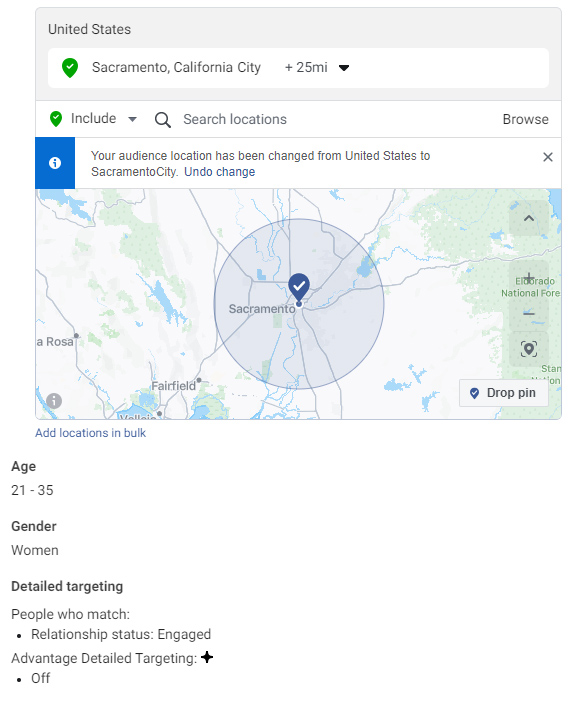
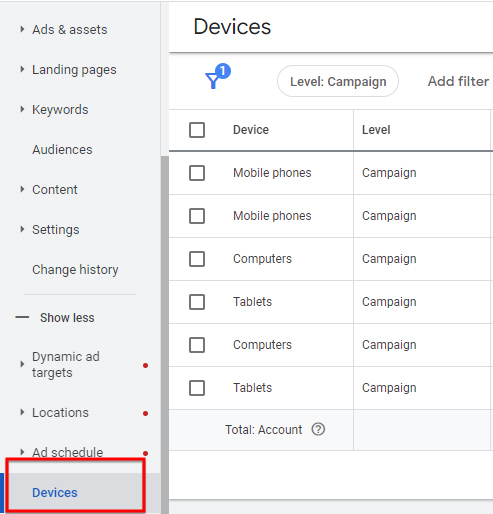
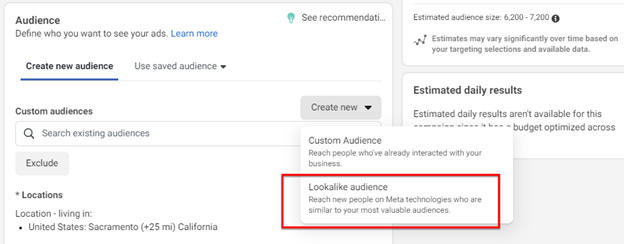
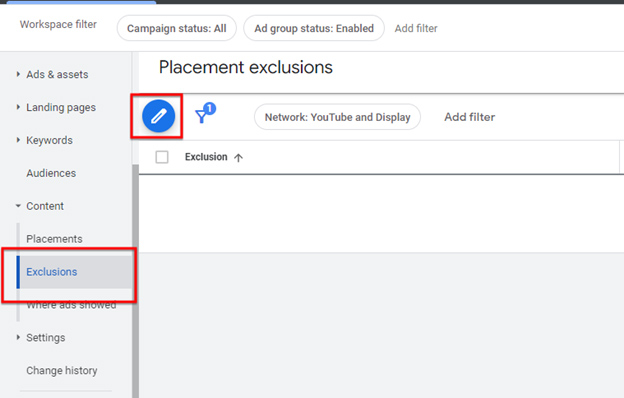
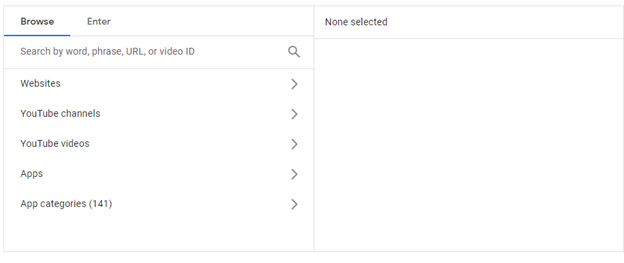
These strategies let businesses use responsive display ads to reach their target audience and boost conversion rates.
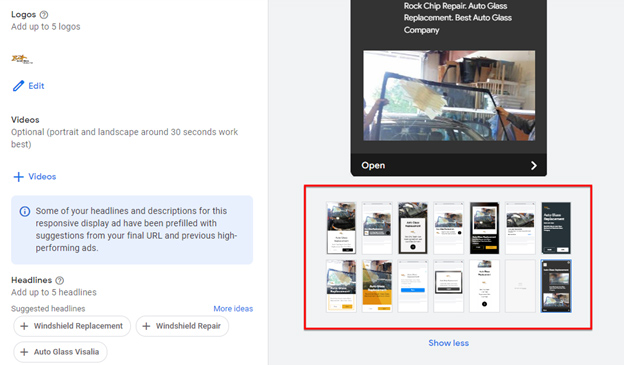



Responsive display ads are an excellent way for advertisers to get their message out and reach customers in a new way. They allow you to quickly create different versions of an ad based on a template, customize the look and feel, and easily adjust the size to match any website or device. This flexibility helps you target the right audience and capture their attention more effectively than static ads can. Furthermore, responsive display ads can fuel advanced data-driven targeting strategies for any digital campaign, providing advertisers with more control over their campaigns and better results.

Choosing a business name can be a challenging but important task, as it represents the identity of your business and can impact its success. Here are the top seven mistakes business owners make when choosing their business name:
1) The Business Name Is Not Memorable
2) The Business Name Is Taken
3) Target Audience Is Ignored
4) SEO Is Not Considered
5) Business Name Reflects You And Not Your Brand
6) Business Has A City or County Name
7) Don’t Get Feedback With Your Target Audience

Make Your Business Name Memorable
Making your business name memorable can be a key factor in establishing brand recognition and building a successful business. You can consider adding puns or business names that sounds cool.
Add Puns To Your Business Name
Puns and alliteration can make a name more memorable, as they stick in people’s minds. Here are some examples of business names that use puns:
• The Bake-A-Boo Bakery
• The Cheesy Grin Cheese Shop
• The Coffee Rave Café
• The Fruity Peek Fruit Shop
• The Hair Raiser Hair Salon
• The Nail Biter Nail Salon
• The Paint Tastic Painting Services
• The Pet’s Pajama Party Pet Store
• The Pizza My Heart Pizzeria
• The Scoop of the Crop Ice Cream Shop
Puns can be a fun and memorable way to name your business, but it’s important to make sure that the pun is not too cheesy or difficult to understand.
How Does The Business Name Sound
Consider the sound of the name: Names with rhythm and rhyme are often easier to remember. For instance, here are some examples of business names that rhyme:
• The Bloom Room Florist
• The Brush Rush Art Supply Store
• The Clean Scene Cleaning Services
• The Dream Team Ice Cream Shop
• The Flash Dash Photography Studio
• The Groom Room Pet Grooming
• The Homey Combo Home Decor Store
• The Joy Toy Toy Store
• The Nice Spice Spice Shop
• The Sweet Treat Bakery
You can go to https://www.rhymezone.com and enter your main keywords to find something that will rhyme with your business name.

Keep Your Business Name Simple
Finally, remember to keep your business name “simple”. Avoid complex or overly long names that can be difficult for customers to recall or share with others. People can’t remember your business if the name is too difficult to pronounce or it’s a tongue twister.

Check The Availability of Your Business Name
This is perhaps one of the most important things when choosing a business name. Make sure the name you choose is available as a website domain name, and also check if the name is trademarked by another business. You can check the availability of a business name by following these steps:
1. Conduct a web search: Start by searching for the proposed name on the internet to see if there are any existing businesses or organizations using the same or a similar name.
2. Search for trademarked names: Check the United States Patent and Trademark Office (USPTO) website to see if the name is already trademarked or if there are any similar trademarks.
3. Check with your state government: Most states have a database of registered business names, so you can check if your desired name is already in use in your state.
4. Check domain availability: Check if the desired name is available as a domain name by visiting websites such as GoDaddy.com or Namecheap.com.
5. Consult a business formation service: Some online legal services, such as LegalZoom, can check the availability of your desired business name and assist you in registering it.
6. Be unique and try to choose a name that sets you apart from the competition and is memorable to customers.
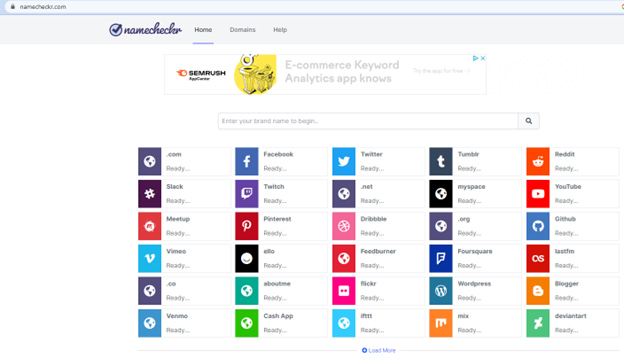
7. Use namecheckr.com to see if your social media profiles are being used by someone else
It’s important to thoroughly research the availability of a name before officially registering your business. This can help avoid potential legal issues in the future, and ensure that your business name is unique and can be used by your company. The last thing you want is to invest lots of time, energy, and money into your business to later find out that someone else has the same business name as you. We’ve seen situations where businesses have to start with a brand new business name, because of a dispute over an existing or very similar business name.

Consider Your Target Audience In Your Business Name
Choose a name that appeals to your target audience and resonates with them. Choosing a business name that targets your audience is an important step in building a successful brand. Here are some tips to help you choose a business name that resonates with your target audience:
1. Know your audience: Consider who your target customers are, what they value, and what type of image they associate with your industry.
2. Use keywords: Consider incorporating keywords related to your products or services into your business name, to make it easier for potential customers to find you when searching online.
3. Be descriptive: A descriptive name can give customers a better idea of what your business does and what it offers.
4. Consider cultural references: If your target audience has a particular cultural background or interests, consider using a reference that will resonate with them.
By considering these factors and testing different names, you can choose a business name that effectively targets your audience and helps you build a strong brand.
Consider SEO When Choosing A Business Name
If you plan to have your business online, consider choosing a name that can help improve your search engine optimization (SEO) efforts.
Search engine optimization (SEO) is an important consideration when choosing a business name because it can have an impact on your online visibility and search engine rankings. Here’s why you should consider SEO when choosing a business name:
1. Keyword relevance: If you include keywords related to your products or services in your business name, it can help improve your search engine rankings for those terms, making it easier for potential customers to find you online.
2. Brand recognition: A business name that is memorable and easily recognizable can help improve brand recognition and make it easier for customers to find your website when searching for your business online.
3. Domain name availability: If you choose a business name that is similar to an existing website or domain name, it can create confusion for customers and harm your SEO efforts. By choosing a unique business name, you can ensure that you can secure a matching domain name and prevent any potential SEO issues.
4. Competitor differentiation: Choosing a business name that sets you apart from your competitors can help improve your SEO and make it easier for customers to find you online.
By considering SEO when choosing your business name, you can help ensure that your business is easily discoverable online and that your brand is memorable and recognizable to your target audience.
Reflect Your Brand In Your Business Name
Consider your brand values. Your business name should reflect the values and mission of your brand. Think about what sets your brand apart from others and what makes it unique. Use descriptive language. A descriptive business name can give customers a clear idea of what your business does and what it offers. For example, I once met a business named “Enterprise Pro Team”. Can you guess what services they offered? Well it turns out they were in the moving business. The problem with this is that people don’t know what the business offers. Moreover, the search engines take into consideration the keywords within the business name when ranking businesses for local search. Also, avoid using industry jargon or terms that may not be familiar to your target audience. We also recommend you don’t use your last name in the business name. You want to make your business is about your brand and not you. Moreover, it can become more difficult to sell your business if your business has built a brand around you instead of your mission, vision, and core values of your company.

Don’t Put A City or County In Your Business Name
There are several reasons why you might not want to include a city name in your business name:
1. Limited geographic reach: Including a city name in your business name can limit your reach if you want to expand beyond that city or if you want to target customers in other locations. We’ve had this situation happen several times with our clients. They’ll grow their business and will want to expand their business to other nearby cities. However, the customers of nearby cities feel reluctant to work with businesses
2. Location-based biases: People may associate certain stereotypes or biases with a city, which can impact how they perceive your business.
3. Outdated information: If you move your business or expand to new locations, having a city name in your business name can make it difficult to update your branding and marketing materials.
4. Confusion with other businesses: If there are other businesses in the same city with similar names, it can cause confusion for customers and make it difficult for your business to stand out.
5. Potential for legal issues: If there is already a business in another city with the same or a similar name, you may face legal issues over the use of the name.
It’s important to consider these factors and weigh the potential benefits and drawbacks of including a city name in your business name before making a decision.
Run A Test With Your Target Audience
Once you’ve chosen a few potential names, test them with friends, family, and potential customers to -get feedback and see which ones resonate best. We’ve had several customers post their top five business names on social media groups. We had one client do this and he got over 150 comments. People love to put in their own two cents when it comes to these things. Moreover, it’s free advertising for your new business.

Let’s Start Brainstorming
Now it’s your turn! When you are in the brainstorming process just write down anything that comes to mind no matter how dumb or silly it might seem at the moment. You can later use the checklist above and use the process of elimination. People often stare at a blank piece of paper for hours because they shut down any idea that comes to mind. You’ll want to make sure to just write even if it’s nonsense. Congratulations you now have a list of business names! Here are couple of questions you’ll want to ask yourself to help narrow it down.
1) Is it memorable?
2) Is it taken?
3) Will my target audience understand what I offer?
4) Does it include the main keyword of what I offer?
5) Does it reflect my brand or am I using my last name?
6) Does it have a city or county name?
7) Did I get feedback from my target audience?
If you need help with this process, then feel free to contact us at 559-553-5000. We have met with over 3000 business owners and are very familiar with the process to help you come up with a business name that works for you. Once you’ve chosen a business name, then give us a call so we can help you with your logo, website, and marketing. Here is another great article on how to take advantage of many free marketing tools online.
TikTok is a growing platform with around a billion active users. Users spend a lot of time on TikTok watching videos, but some prefer to produce videos for others. There are a few ways that an average person can obtain a TikTok following. All of the people that have a larger TikTok audience gained it through various means.
1. Stay consistent with your content
TikTok viewers will return to your page for your content mainly to see more of what they followed you for. People follow the NFL TikTok to see football, and they will follow you to see more of the content that they initially found interesting on your page. Consistency is a skill that TikTok creators have to use to keep the audience they gained. Being consistent with your videos could land you in a position where your followers anticipate your videos and promote them among their peers. A few consistent accounts would include food and art accounts, an example of one of these accounts includes the cooking user samseats.
@samseats Pea & Mint Pasta 🍝 #food #tiktokfood #foodtok #tiktokfood #pasta ♬ original sound – Sam Way
2. Keep your goal in mind
Stay oriented on your views and likes count. What can be said about obtaining followers is that it is largely determined by what you put out and how people respond to it. You would want to focus less on following for right now (if you want to do it a legitimate way). The main reason for this is that both views and likes are required to assess how well your material performs. Views, Likes, Comments, Shares, Duets, and Stitches are all things you’ll need to consider.
3. Stay consistent with your schedule
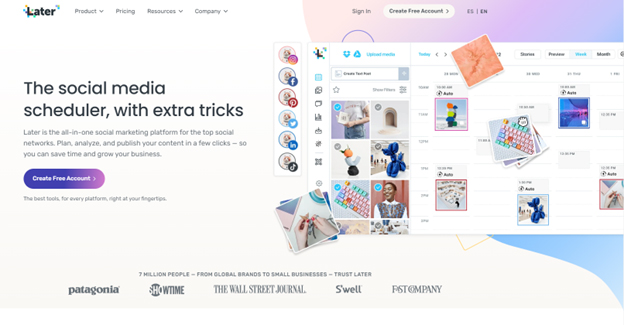
Consistency can mean one of two things (or both), keeping to a specific niche and constantly promoting that niche’s content, or sticking to a posting schedule and uploading at specific times. Both would be good, and TikTok has multiple ways that its algorithm works. Therefore, posting consistent content would be essential if you want people who enjoy videos similar to yours to see it. Consistency can be obtained through good routines or a well-planned schedule. There are so many good schedule management tools out there for you to choose from. Alternatively, there is a way to automatically post TikTok videos at a specific time. Making a series of videos to entice viewers to return to your channel for additional content is also a great way to boost your page. One great tool that you can use is called later.com. This tool is great, because it will allow you to stay on schedule with your TikTok posts and all of your other social media platforms. Also, many times people get stuck on trying to figure what to post about. Here you can find a really nice social media infographic to help get you jump started.
4. Make it interesting
A lot of times when a trend appears on TikTok, videos will attempt to put a new spin on it. A great way of gaining followers is putting an unexpected and smart twist on a trend that is currently being used by others. This will make your content stand out from the rest, and seeing something fresh once in a while will certainly gain some followers. There are so many ways you can switch up your content like:
● Mixing trends together
● Adding a new song or changing a major part of the trend
● Making things unexpected
5. Post Content That Is High in Volume and Easy To Rank For
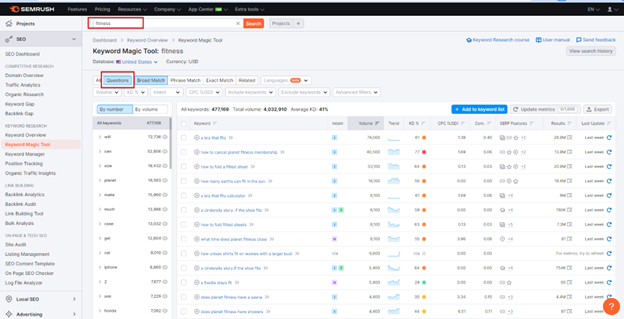
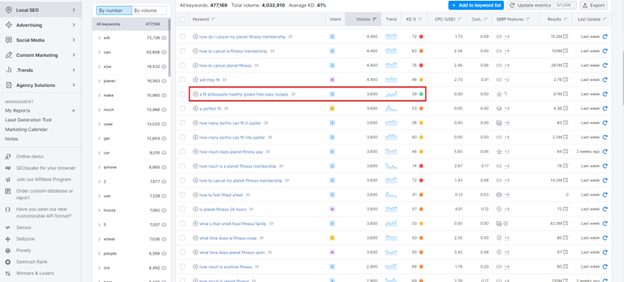
A great tool for this is semrush.com. You can sign up for a free trial with them and take advantage of this powerful tool. Once you sign up, you can go to the “Keyword Magic” tool. Here you’ll want to type a seed keyword. For example, let’s say your channel is about fitness. This means your seed keyword could be “fitness”, “exercise”, “work out”, etc. Next, you’ll want to click on the tab that says “Questions”. This will let you know what are the most common questions around the seed keyword you chose. In this example, let’s go with the seed keyword “Fitness”. Once you get your search. results, then you’ll want to see what questions get plenty of searches but are easy to rank for. In this particular example, we can see that “a fit philosophy healthy gluten free easy recipes” has 3600 searches per month and is easy to rank for. This means that you have a higher probability of showing up on this topic, because few people online have content on this topic and there is enough search volume to get new followers. Posting content that people search for and is low in competition will give you a strong foundation to get more TikTok followers
6. Keep your viewers interested
Make your content enticing to viewers. It is possible to perform a variety of things to create intriguing content, but it boils down to content that people want to see. Your videos should always have the motive to have as many people see them. These can involve having an interesting hook for your content or making your videos short and impactful. What you can do to find content like this is to look for inspiration from other creators in your niche. A Youtuber by the name of Jack Gordon did an experiment on how the TikTok algorithm works, he found that the best thing to do to get traction is being interesting enough for people.
6. Keep your viewers interested
Make your content enticing to viewers. It is possible to perform a variety of things to create intriguing content, but it boils down to content that people want to see. Your videos should always have the motive to have as many people see them. These can involve having an interesting hook for your content or making your videos short and impactful. What you can do to find content like this is to look for inspiration from other creators in your niche. A Youtuber by the name of Jack Gordon did an experiment on how the TikTok algorithm works, he found that the best thing to do to get traction is being interesting enough for people.

7. Let people know
Many of the ways that people get TikTok views is how they make videos that provide information. Usually, this goes over the genres of “fun facts” and “life hacks”. The reason why people go to these accounts and follow them is that the content is simple and easy to digest, while also being interesting enough to keep going.
● Give fun informational content that makes the user want more
● Use something that relates to your audience
● Make sure you give the audience a reason to watch

8. Give your content a unique personality
A lot of famous TikTok users have something to offer to the platform whether that be their comedic input or their favorable personality. What people want to see is not only a video, but they want a person with emotions behind them. You should not only show some personality, but you should also do it to connect yourself and your viewers.
If a TikTok account has a face attached, it’s really good practice to give your videos a personal style to them. This would make your viewers interested in more of your content just by how they offer something special.
Stick to a specific personality. This will make your videos much more consistent, as they would get familiar with your content and how you act most of the time. A lot of the personality your followers will see will likely be based on the one you show the most.
9. Do TikTok Duets
TikTok is a very social platform. Duets and other communal activities are a great tool for widening your audience. Not only will you be featuring others in your content, but the outside help could bring in audiences from other communities and accounts. Making friends and socializing around the app will gain you, followers.
Duets and stitches are wonderful ways of collaboration, and a lot of people keep duets and stitches available for everyone to perform, allowing you to add to anybody’s content with your input. Creators usually check who uses their videos for duets or stitches, so sometimes they may even react to your content. Just go to a video, tap Share, and hit the duet button.

10. 10. Collaborate with Other TikTok Creators
Get friends to help you create content or find some on the platform. Many people collaborate with others they know because it’s much easier than finding someone on TikTok. These people can give you ideas, increase the number of views on your videos by appearing in them and letting their followers see them, or tell you what you need to improve on.
11. Use hashtags often
Using hashtags at certain times can certainly boost your chances of reaching more people and getting more followers. The top 3 tags on TikTok are #fyp, #tiktok, and #foryoupage. Some tags get a lot of attention, so your account could get many more followers that way.
12. Get Specific with Your Tags
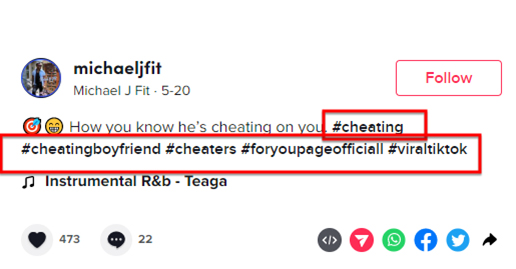
Specific tags could get your content a huge boost. If your content is about cooking, put the “#cooking” tag. It’s very self-explanatory. Using tags like this would attract the people that follow that tag and people who enjoy content from that tag. A good example is artists use art-related tags like “#art” to get their content out to other artists and people who like that content.
13. Use branded hashtags
Branded hashtags will be greatly beneficial to you. TikTok includes several paid and sponsored hashtags that will greatly increase the odds of your video being seen by others. Many branded hashtags are challenges that challenge creators to do something, but a lot of users use the tags anyway without the challenge.
14. Use pinned posts
Use your pinned posts to display your best works. The best thing to do is use your pinned posts to show the videos that got you the most views or likes. This will show others the content that most people like from you, and it shows off what you are proud of the most. The pinned posts should have at least something that every viewer of your channel should see.
15. Watch Your Share Count
Always watch the number of shares that you get. Being able to understand what gets more shares can mean a lot for your account. The more shares you get; the higher chance it is that people with who it’s shared follow your account as well. This should mean that you should also care about getting your followers to share more, whether that comes from specific content or by asking your audience to share. What you would need to do for this is to go to the analytics in TikTok’s settings.
16. Make your own trends
You should even try to make your own trend. If your trend takes off, many of the people who use your trend will mention or tag you in their videos. It would be even better if you make your own tag for it, so more of these people find the content easier. Making something like your own trend is somewhat hard and it may take some time to get going. A popular material that you may include in your TikTok, such as shows or movies, are good examples of trends that can be started.

17. Livestreaming
Go live! A whole other side of TikTok is opened through live streaming. Using TikTok live, many people see these streams just by hitting the “LIVE” button set on the top left corner of the video feed. Lives can provide many functions; donations, live chat, and followers that can interact with you on another level. These live streams can be mainly whatever people would want. The only thing about live streaming is you need over a thousand followers. The best thing to do is post a video before going live.
18. Keep Video Downloads On Your TikTok
A lot of your followers may come from outside sources. You should keep downloads on so people can share your content. If people in your community enjoy your content, they can download your video with your username as a watermark. If people post these videos outside of your space (like on Instagram or other social media), they can gain traction there and have viewers look for your account for more of your videos.
19. Use A Computer to Make TikTok Videos
Using TikTok on a computer is a valid way of making videos. Using video editing software through the computer has many more opportunities and openings to get more followers. Not only can you edit faster, but you can also edit videos better and at a higher quality than a mobile phone. There are also many different editors on a computer rather than on a phone. You may now upload a lot more thanks to how you can use computer records.
20. Promote Your Tik Videos
Promoting your TikTok will get many people to flock to it, specifically promoting it on other social media. If you use promotions on other accounts, it can give you extra followers through it. Depending on how popular the person who is promoting you is, there is a chance that you can get a definite large amount of followers because of it. In that situation, it’s like an ad but more personal; you get an account that wants to promote you for free or for a sum of money, then they post something to get you on their account. Places like this can be Facebook, Instagram, or YouTube. You can also use TikTok’s promote tool
21. TikTok Slideshows
Use slideshows, a somewhat new TikTok feature that allows multiple images to be inside of a single TikTok Slideshow. A lot of interesting things have been made with it so far. This feature gives much more opportunities to interact with your content (that isn’t live content). This can be used to make sure that the people that see your content are stopping and interacting with it. Slideshows can vary; various art pieces, pictures, or even just a compilation of something.

22. Interact with your community
Reaching out to your viewers is a great way to grow followers. Sometimes replying to comments through videos gives your followers more interaction, and many love that connection with the creator.
23. Know your audience
Having a good relationship with your audience lets you know who the majority is, and what they enjoy about your content. Communication is key when it comes to figuring out what gets you, followers. A good example of this is simple criticism and compliments. Knowing what your audience does and doesn’t like is important because this lets you know what will get you the most views.
24. Stay Positive
Understandably being positive to your followers will give you many benefits. Positivity on social media gives influencers and companies a bigger chance of their followers coming back to see the content they put out. What’s even better is that followers are more likely to share their content with people they know.
25. Use popular audios
This goes hand in hand with the hashtags, popular audios that are trending could give you a great boost. Many people will look for specific videos with a filter or audio. Generally, the “for you page” should certainly show some of them that are trending. What you can do is simply look up the most popular audios, a good resource is Tokboard, a free site that ranks audios by popularity weekly and monthly. You can always lower the volume of the audio to get the popularity of the audio without it playing in the video.

26. Use or make custom audios
Making your audio is easy, just make your video, and then on the bottom right corner, it should allow your audio to be made public. People can then use your audio on their videos. This could get your content recognized as people who search for the audio will be shown the original first.
27. Use TikTok Filters
Although it’s quite complicated to make a TikTok filter. However, you can use many of the other filters that talented people make. A lot of these filters also come with some sort of trend or challenge. A lot of filters are not used by many people, and some are extremely popular depending on the usage. You can use whatever suits your content at the time.
28. Use other platforms and apps
Having trouble on TikTok might mean that you should try and build a following on other platforms. A great platform to try is something like Instagram. If you do well there, you can shift to TikTok and have a portion follow you back to TikTok.
29. Create A Complete Bio
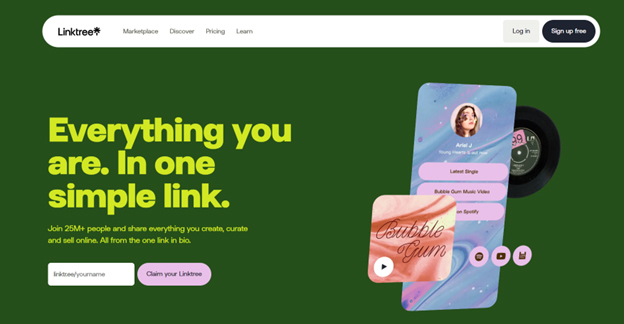
Other platforms can also add to TikTok. Adding links to your bio on TikTok can attract others to different sites. It is suggested that you use a social media landing page like Linktree, so if your viewers want more content, it is accessible that way.
30. Download a video editor
Using different apps to edit your TikTok videos can significantly enhance your video quality, video editing software on a mobile device ranges in various features, one, in particular, is CapCut; a software that allows for extra control over what your videos look like.
31. Stay Away from Bots
Using bots on TikTok is bad for multiple reasons, mainly because it usually never turns out well. Bots will indeed get your follower account up but all of them aren’t real people. Your videos will look suspicious due to the high follow count compared to views and likes. These bot services usually also require money to use. accounts with a lot of bot followers won’t be eligible for verification “blue checkmark”, so if you plan to grow, this option is less than ideal.
32. Avoid negative attention
Gaining the attention of peers and viewers through negative means may be the worst form of attention. This will spawn an array of problems, from many disliking you, to people unfollowing you because of your antics. What can be said is much negative attention does give popularity, but that popularity comes at a major cost to your image.
33. Learning how to take criticism
Learning how to take criticism could get you out of a lot of trouble. First, it’s good to understand constructive and destructive criticism. Why criticism is so good is that they help you improve your content in ways that make your followers happy. The inability to take criticism could mean a lot of things.
34. Check-In On yourself mentally
You must make sure that you are well mentally. There are so many things that can and will affect your life. You should always put your mental problems over social media. Not only does things like having anxiety make it harder to do things, but it is also a really difficult thing to deal with.
Going onto TikTok to gain followers may seem daunting at first, but with a bit of time and effort, you could have yourself a community of your own. Whether it be a personal account or a group-made one, you’ll now understand what you need to gain a TikTok following.